Secure File Sharing: Answers to Your Most Pressing Questions
Encryption alone fails if access controls allow unauthorized users to decrypt files after they arrive at their destination.
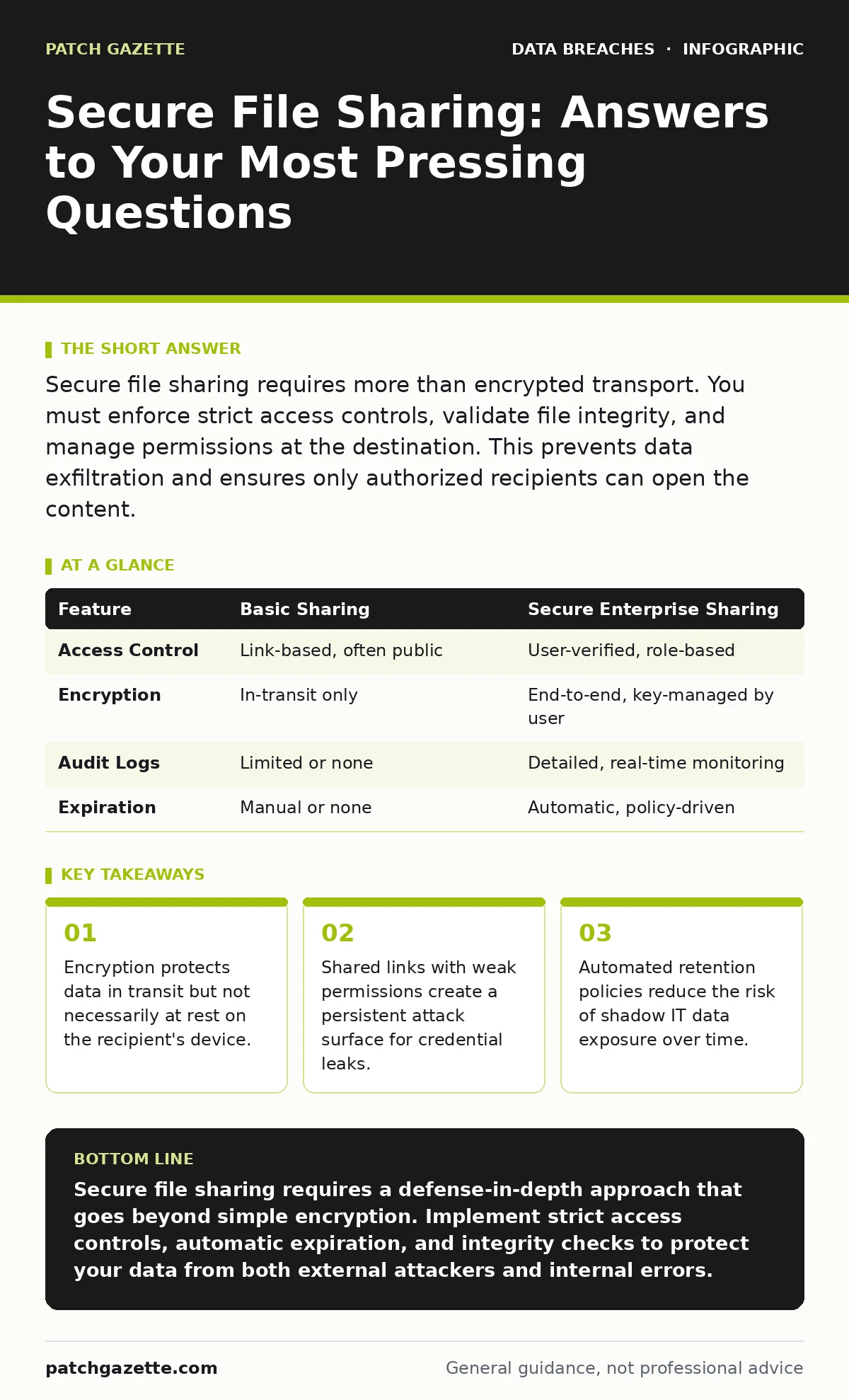
Secure file sharing requires more than encrypted transport. You must enforce strict access controls, validate file integrity, and manage permissions at the destination. This prevents data exfiltration and ensures only authorized recipients can open the content.
Does encryption protect my files from all threats?
Encryption protects your data while it moves across networks, but it does not stop an attacker who already has valid access credentials. If a recipient’s device is compromised, the file decrypts normally and becomes readable to malware. You must pair transport layer security with endpoint detection and response tools. This combination ensures that even if the channel is secure, the destination remains safe.
How do I prevent shared links from becoming public?
You must disable default public access for any file sharing service you deploy. Many platforms allow users to create links that anyone with the URL can view, which creates a significant risk of misconfigured cloud storage leaks. Enforce a policy that requires explicit recipient verification, such as email authentication or single-use codes. This ensures that only the intended person receives the file, not anyone who guesses the link.
What is the risk of using personal cloud accounts for work?
Personal accounts often lack the enterprise-grade security controls and audit logs required for business data. This practice creates shadow IT data exposure because you cannot monitor who accesses or downloads the files. Corporate directories should restrict file sharing to approved, monitored platforms only. This allows you to revoke access immediately if an employee leaves or if a device is lost.
How can I ensure a file has not been altered?
You must use digital signatures or hash verification to confirm file integrity. Without this, you cannot know if a man-in-the-middle attack modified the document during transfer. Digital signatures bind the sender’s identity to the file content, making any subsequent change detectable. This is critical for legal documents, financial records, and software updates where accuracy is non-negotiable.
Should I allow recipients to edit shared files?
You should restrict permissions to read-only unless collaboration is explicitly required. Edit access increases the attack surface, allowing malicious actors to inject code or alter sensitive information. Use role-based access control to define exactly what each user can do with the file. This minimizes the chance of accidental deletion or deliberate tampering by unauthorized users.
See also: SAML vs OAuth: Which Protocol Fits Your Cloud Architecture? · Spot Privilege Escalation Warning Signs Before Breach
How long should shared files remain accessible?
You must set automatic expiration dates for all shared links and files. Permanent access increases the window of opportunity for attackers to exploit forgotten credentials or compromised accounts. Align retention periods with your data minimization principles to keep only what is necessary for the shortest time possible. This reduces the volume of data at risk if a breach occurs later.
Can I trust a file sharing service that promises end-to-end encryption?
You should verify that the service provider cannot access the encryption keys. True end-to-end encryption means only the sender and recipient hold the keys to decrypt the data. If the provider holds the keys, they can be compelled to hand over the data or suffer a server-side breach. Look for services that publish their cryptographic standards and undergo independent audits.
How do I handle large files securely?
Large files often bypass standard security checks due to size constraints, making them a vector for data exfiltration. You must enforce chunked encryption, where the file is split and encrypted in parts before transmission. This ensures that even if one chunk is intercepted, it is useless without the others and the decryption key. Additionally, monitor large transfers for unusual patterns that might indicate malicious activity.
| Feature | Basic Sharing | Secure Enterprise Sharing |
|---|---|---|
| Access Control | Link-based, often public | User-verified, role-based |
| Encryption | In-transit only | End-to-end, key-managed by user |
| Audit Logs | Limited or none | Detailed, real-time monitoring |
| Expiration | Manual or none | Automatic, policy-driven |
What happens if a recipient’s account is compromised?
You must have a mechanism to revoke access instantly across all shared files. If an attacker gains entry to a recipient’s account, they inherit all permissions granted to that user. Automated revocation tools allow you to cut off access without contacting each recipient individually. This limits the blast radius of a single credential leak.
How do I verify the sender’s identity?
You must use multi-factor authentication and digital certificates to confirm the sender’s identity. Email spoofing and fake sharing portals are common methods to trick users into downloading malware. Verify that the sharing domain matches your approved vendor list before opening any attachment. This simple step prevents many social engineering attacks.
Key takeaways
- Encryption protects data in transit but not necessarily at rest on the recipient's device.
- Shared links with weak permissions create a persistent attack surface for credential leaks.
- Automated retention policies reduce the risk of shadow IT data exposure over time.
Secure file sharing requires a defense-in-depth approach that goes beyond simple encryption. Implement strict access controls, automatic expiration, and integrity checks to protect your data from both external attackers and internal errors.
Frequently asked questions
Is secure file sharing the same as encrypted email?
No. Encrypted email protects the message in transit, but secure file sharing manages access, permissions, and integrity of the file itself on the recipient’s end.
Can I use standard cloud storage for confidential data?
Only if you configure it with enterprise-grade security settings, including mandatory two-factor authentication, disabled public links, and detailed audit logging.
How do I prevent data leaks from mobile devices?
Enforce mobile device management policies that require encryption, remote wipe capabilities, and app-level access controls for any file sharing applications.
What is the biggest mistake organizations make with file sharing?
They assume that once a file is encrypted, it is safe. They neglect to manage who can access the file after it arrives and how long it remains available.
How this guide was produced: written by the Patch Gazette editorial team with AI assistance, checked against the public references listed below, and reviewed when the facts change. See our editorial policy or report an error.