Secure File Sharing: Real Benefits and Hidden Limitations
Secure file sharing controls access but introduces new failure points around key management and user behavior that traditional email avoids.
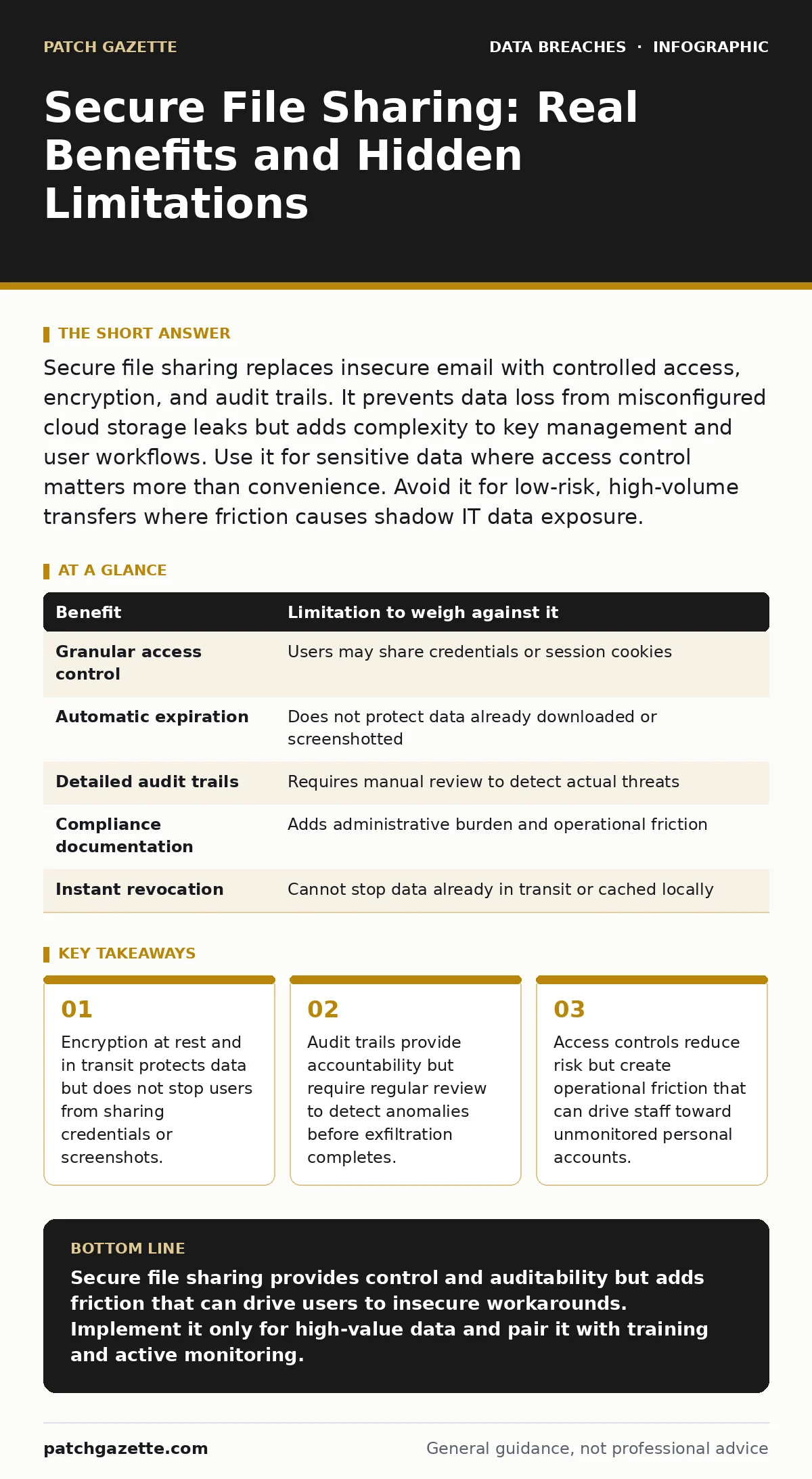
Secure file sharing replaces insecure email with controlled access, encryption, and audit trails. It prevents data loss from misconfigured cloud storage leaks but adds complexity to key management and user workflows. Use it for sensitive data where access control matters more than convenience. Avoid it for low-risk, high-volume transfers where friction causes shadow IT data exposure.
How Secure File Sharing Works
Secure file sharing replaces standard email attachments with a controlled transfer mechanism. The system encrypts data at rest and in transit using standard protocols. It replaces open access with authenticated entry. Users receive a link or login prompt instead of a raw file. The platform logs every access attempt, download, and view. This creates a verifiable record of who touched the data and when. The mechanism shifts security from the network perimeter to the data object itself. This shift allows data to move outside the corporate firewall while maintaining policy enforcement. You gain visibility into data movement that email servers cannot provide.
Concrete Benefits for Data Protection
The primary benefit is granular access control. You dictate exactly who can open the file, how many times, and for how long. Expiration dates remove stale data from the wild automatically. Watermarking deters casual leakage by marking every viewed page with the viewer’s identity. Audit trails give you a timeline of events for forensic analysis. You can revoke access instantly if a device is lost or an employee leaves. This immediacy is impossible with email. Once an email is sent, you cannot take it back. Secure file sharing gives you a kill switch for distributed data. It also ensures compliance with frameworks like the HIPAA Security Rule by providing required documentation of access.
Honest Limitations and Hidden Costs
The system does not protect against human error at the endpoint. If a user shares their login credentials, the access controls fail. If a user takes a screenshot, the watermark helps but does not prevent the image from spreading. The platform adds friction to the workflow. Users must log in, wait for links, or manage tokens. This friction can lead to frustration and workarounds.
Staff may bypass the system to save time, creating shadow IT data exposure. Key management becomes your responsibility. If the encryption keys are lost or compromised, the data is either unusable or exposed. You trade convenience for control. The operational overhead of managing permissions and reviewing logs is significant. You must have staff dedicated to monitoring these logs for them to have value.
| Benefit | Limitation to weigh against it |
|---|---|
| Granular access control | Users may share credentials or session cookies |
| Automatic expiration | Does not protect data already downloaded or screenshotted |
| Detailed audit trails | Requires manual review to detect actual threats |
| Compliance documentation | Adds administrative burden and operational friction |
| Instant revocation | Cannot stop data already in transit or cached locally |
When It Is Worth It
Use secure file sharing when the data value exceeds the cost of friction. Financial records, intellectual property, and personal health information require this level of control. The risk of a breach outweighs the inconvenience of extra login steps. Use it when you must prove compliance to regulators. The audit trail provides the evidence needed for audits.
Use it when sharing with external partners who do not trust your network. The platform provides a neutral, secure ground for exchange. It also helps when you suspect insider threats. The detailed logging allows you to spot unusual download patterns early. If the data can cause significant harm if leaked, the added security layers are justified. The ability to revoke access is a critical safety net.
When It Is Not Worth It
Avoid secure file sharing for low-risk, high-volume transfers. Sending a draft document to a colleague for quick feedback does not justify the delay. The friction will cause users to find faster, less secure alternatives. Do not use it for large files that do not contain sensitive information. The storage and processing costs may outweigh the security benefits. If your organization lacks the staff to monitor logs, the tool is a false positive.
An unread audit trail provides no security value. It creates a sense of safety without actual protection. Also, avoid it if your users are not trained on security basics. They will likely fall for phishing attempts that steal their secure portal credentials. The tool becomes a single point of failure. In these cases, standard email with clear usage policies may be more effective.
See also: Single Sign-On Misconceptions That Compromise Cloud Security · What Is Broken Access Control: Mechanisms, Risks, and Fixes
The Role of User Behavior
Technology cannot fix bad habits. Secure file sharing assumes users will follow the process. They often do not. Users may forward the secure link to unauthorized parties. They may print the document and leave it on a desk. They may discuss the contents in an unsecured chat. You must train users on why the friction exists. Explain that the extra steps protect them from identity theft and corporate liability.
Make the security process as easy as possible. Reduce the number of clicks required to access files. If the secure method is harder than the insecure one, users will choose the insecure one. Monitor for signs of bypass. Look for large attachments in email that should have been shared securely. Address these incidents as training opportunities, not just disciplinary actions.
Integrating with Existing Security
Secure file sharing must fit into your broader security strategy. It should integrate with your identity management system. Single sign-on reduces password fatigue and improves security. It should connect with your data loss prevention tools. This allows you to block sensitive data from leaving via other channels. It should align with your incident response plan.
Define how you handle a compromised account. Define how you revoke access during a breach. Do not treat it as a standalone solution. It is one layer in a defense-in-depth strategy. It complements other measures but does not replace them. You still need firewalls, antivirus, and user training. The file sharing platform is a specialized tool for a specific job.
Balancing Control and Usability
The best security solution is the one users actually use. If your secure file sharing platform is too complex, it will fail. Test the user experience regularly. Ask staff for feedback on the workflow. Remove unnecessary steps. Automate permission assignments where possible. Use default policies that are secure but not restrictive. Allow exceptions for urgent needs but require approval.
Review these policies periodically. Adjust them based on actual usage patterns. If users are consistently bypassing the system, your controls are too tight. Find the balance between protection and productivity. Security that stops work is security that gets ignored. You need a system that enables work while protecting data. This balance requires constant adjustment and attention.
Key takeaways
- Encryption at rest and in transit protects data but does not stop users from sharing credentials or screenshots.
- Audit trails provide accountability but require regular review to detect anomalies before exfiltration completes.
- Access controls reduce risk but create operational friction that can drive staff toward unmonitored personal accounts.
Secure file sharing provides control and auditability but adds friction that can drive users to insecure workarounds. Implement it only for high-value data and pair it with training and active monitoring.
Frequently asked questions
Does secure file sharing prevent data leaks completely?
No, it reduces the risk by controlling access and logging activity, but it cannot stop users from sharing credentials, taking screenshots, or printing documents.
How does this differ from standard email encryption?
Standard email encryption protects data in transit but offers no control over access after delivery. Secure file sharing allows you to revoke access and set expiration dates.
Can secure file sharing help with data sovereignty requirements?
Yes, many platforms allow you to choose where data is stored, ensuring it remains within specific geographic boundaries as required by local laws.
What happens if the secure file sharing service goes down?
Access to shared files is interrupted. You should have a backup plan for critical transfers, such as using encrypted local storage or alternative approved channels.
How this guide was produced: written by the Patch Gazette editorial team with AI assistance, checked against the public references listed below, and reviewed when the facts change. See our editorial policy or report an error.