Service Account Security: Stop Invisible Breaches Before They Start
Most cloud breaches originate from service accounts that retain access long after their original purpose has ended, creating silent entry points for attackers.
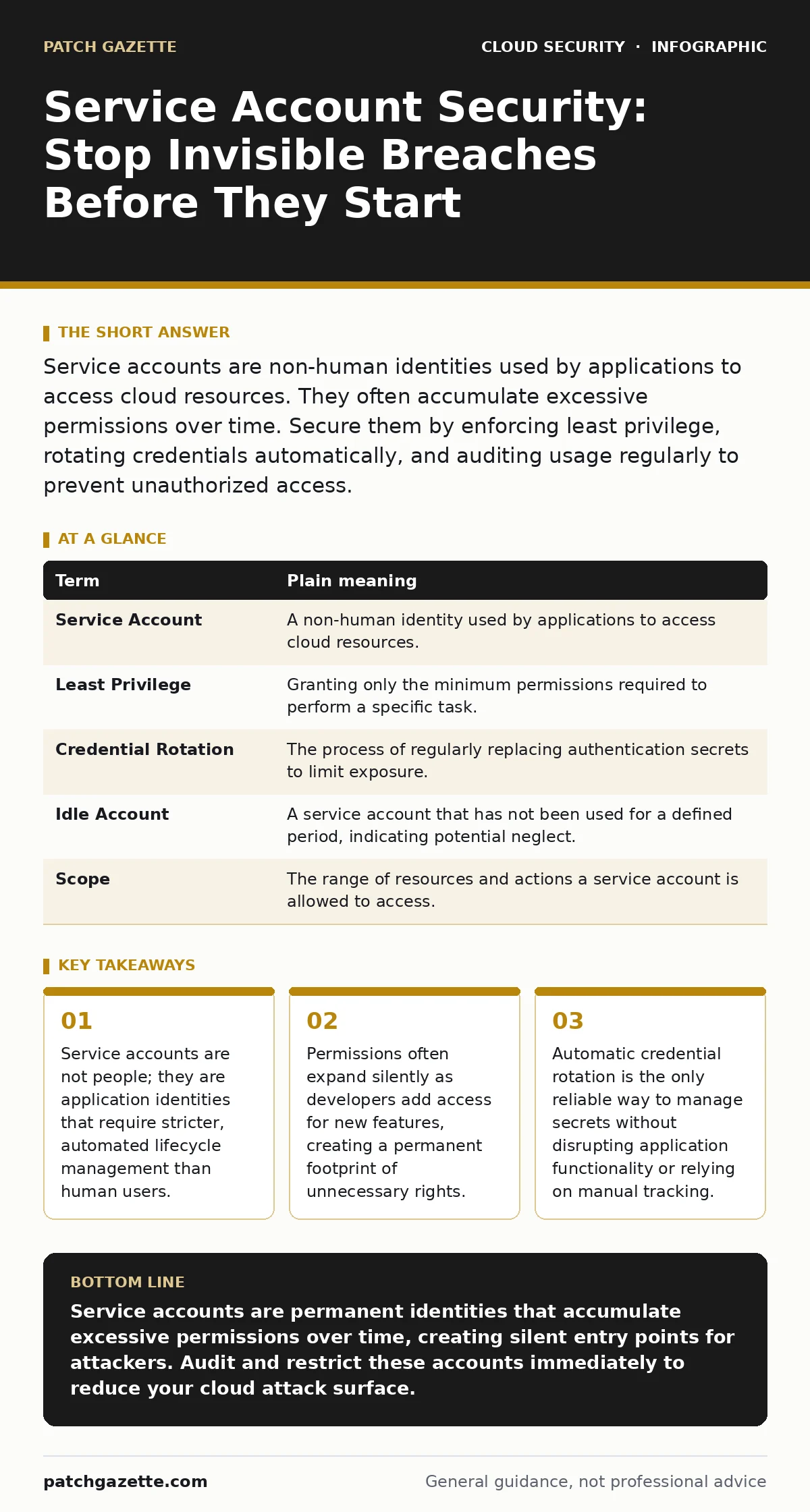
Service accounts are non-human identities used by applications to access cloud resources. They often accumulate excessive permissions over time. Secure them by enforcing least privilege, rotating credentials automatically, and auditing usage regularly to prevent unauthorized access.
The Janitor Key Analogy
Imagine you hire a janitor to clean the breakroom at night. You give them a single key that opens only the breakroom door. They use it for six months, then leave. You never take the key back. Two years later, a new janitor needs access to the storage closet. Instead of cutting a new key, you give them the old breakroom key because it is still in your drawer.
Now that key opens both rooms. The breakroom janitor no longer works there, but the key still works. In cloud infrastructure, this key is a service account. It is an identity used by software, not humans, to interact with cloud services. When you fail to remove old keys, you leave doors open for anyone who finds them.
Defining Non-Human Identities
A service account is a cloud identity created for applications, scripts, or automation tools. Unlike human users, these accounts do not log in with a password via a web browser. They use credentials, such as API keys or certificates, to authenticate. These credentials allow the software to read data, write logs, or manage compute instances.
Because service accounts run in the background, they often operate without human oversight. They persist long after the project that created them is finished. This permanence makes them dangerous. If a human account is compromised, you can force a password reset. If a service account is compromised, the attacker may have uninterrupted access to critical systems until you detect the anomaly.
| Term | Plain meaning |
|---|---|
| Service Account | A non-human identity used by applications to access cloud resources. |
| Least Privilege | Granting only the minimum permissions required to perform a specific task. |
| Credential Rotation | The process of regularly replacing authentication secrets to limit exposure. |
| Idle Account | A service account that has not been used for a defined period, indicating potential neglect. |
| Scope | The range of resources and actions a service account is allowed to access. |
The Hidden Cost of Convenience
Developers often create service accounts with broad permissions to speed up testing. It is easier to grant "read-all" access than to configure precise permissions for a single database table. This convenience creates technical debt. Over time, these accounts accumulate rights they no longer need.
This accumulation is invisible. There is no alert when a service account gains new privileges unless you actively monitor policy changes. The account sits in the background, holding keys to rooms the application never visits. This is a common blind spot in cloud vulnerability management, where focus often remains on software flaws rather than identity configuration.
Imagine a logging agent that only needs to write to a specific log bucket. If it is granted administrative rights to the entire virtual private cloud, an attacker who compromises the logging agent can spin up expensive compute instances or exfiltrate data from unrelated projects. The initial breach is small, but the lateral movement is unrestricted.
Automating Credential Lifecycle
Manual credential management fails at scale. Humans forget to rotate keys. They lose track of which application uses which key. You must automate the generation, rotation, and revocation of secrets. Credential rotation replaces old keys with new ones on a fixed schedule.
This process limits the window of opportunity for an attacker. If a key is stolen, it becomes useless after the rotation period expires. Many cloud providers offer managed identity services that handle this automatically. These services generate short-lived tokens that are valid only for a specific duration and scope.
Implementing Least Privilege
Start by identifying what a service account actually does. Does it need to read, write, or execute? Does it need access to all resources or just one? Apply the principle of least privilege. Grant only the permissions required for the current function.
Review permissions quarterly. Look for accounts that have not been used in 90 days. These are idle accounts. They serve no purpose and represent pure risk. Delete them or restrict their scope to zero until a new use case emerges. This discipline is central to CIS Benchmarks, which provide standardized configuration guidelines for secure cloud environments.
See also: How Cloud Ransomware Works: The Step-by-Step Attack Chain · Shadow IT: What It Is and How to Reduce the Hidden Risk
Try This Now
- List all service accounts in your primary cloud project. Identify those created more than six months ago.
- Check the last access timestamp for each account. Flag any account that has not authenticated in the last 90 days.
- Restrict the scope of the most critical service account to only the resources it actively uses. Remove any broad administrative permissions.
Monitoring and Detection
You cannot secure what you cannot see. Enable logging for all service account activity. Monitor for unusual patterns, such as access from unexpected IP addresses or usage outside business hours. Integrate these logs with your security information and event management system.
Be aware that shadow IT often involves service accounts created by developers without IT approval. These accounts bypass standard security controls. Regular audits of IAM policies help uncover these rogue identities. Without visibility, you are defending a perimeter you do not fully understand.
Key takeaways
- Service accounts are not people; they are application identities that require stricter, automated lifecycle management than human users.
- Permissions often expand silently as developers add access for new features, creating a permanent footprint of unnecessary rights.
- Automatic credential rotation is the only reliable way to manage secrets without disrupting application functionality or relying on manual tracking.
Service accounts are permanent identities that accumulate excessive permissions over time, creating silent entry points for attackers. Audit and restrict these accounts immediately to reduce your cloud attack surface.
Frequently asked questions
How often should I rotate service account credentials?
Rotate credentials every 24 to 90 days, depending on your security policy and the sensitivity of the data accessed. Automated rotation is preferred.
Can I use human accounts for applications?
No. Human accounts are tied to individuals and expire when they leave. Service accounts are tied to applications and persist. Mixing them causes security and compliance failures.
What is the difference between a service account and a user account?
User accounts are for humans and typically use multi-factor authentication. Service accounts are for software and use machine-readable credentials like keys or tokens.
How do I find unused service accounts?
Query your cloud provider’s identity and access management logs for accounts with no authentication events in the last 90 days. These are candidates for deletion.
How this guide was produced: written by the Patch Gazette editorial team with AI assistance, checked against the public references listed below, and reviewed when the facts change. See our editorial policy or report an error.