Warning Signs of Dependency Confusion Attacks in Your Build Pipeline
Internal package registries often accept external packages if they share a name, allowing attackers to inject malicious code into your software supply chain.
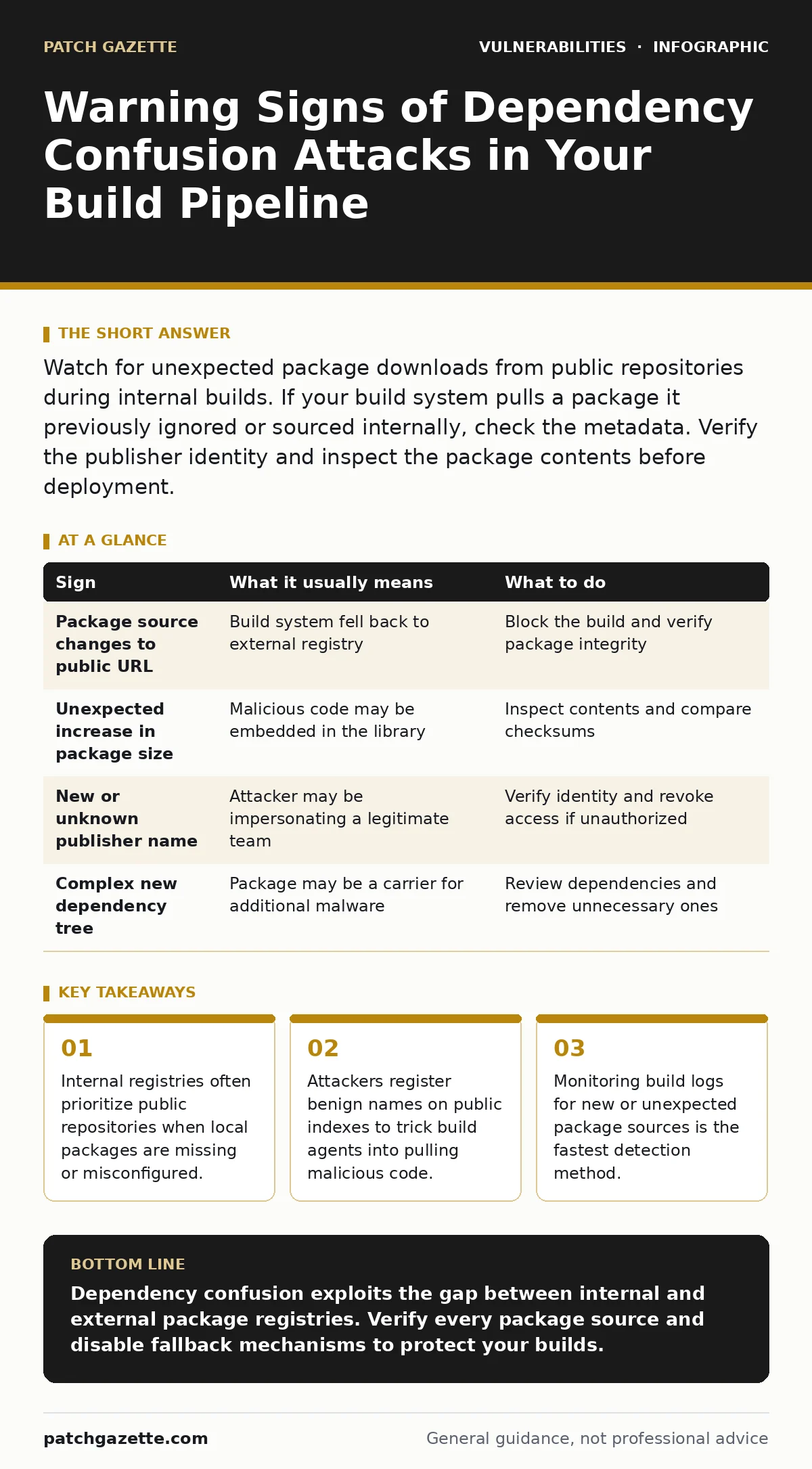
Watch for unexpected package downloads from public repositories during internal builds. If your build system pulls a package it previously ignored or sourced internally, check the metadata. Verify the publisher identity and inspect the package contents before deployment.
The Shadow Registry Problem
Your organization likely maintains an internal package registry to store proprietary libraries. This system keeps code secure and ensures version consistency across teams. However, many build systems are configured to fall back to public repositories when they cannot find a package locally. This fallback mechanism creates a blind spot. If an attacker registers a name that matches an internal library on a public index, your build agent may pull the external package instead. This is the core mechanic of a dependency confusion attack.
The attack relies on the assumption that internal package names are unique and safe. Attackers scan for common internal naming patterns, such as company-specific prefixes. They then publish a lightweight, malicious package with that exact name to a public repository. When your build system queries the registry, it may see the public package and download it if the internal one is not found or if the public index has higher priority.
Immediate Indicators in Build Logs
The first sign usually appears in your continuous integration logs. You will see a package being downloaded from a public source that was previously pulled from your internal server. Check the timestamp and the source URL. If a package that has always come from your private registry suddenly originates from a public domain, stop the build immediately. This change in origin is rarely accidental.
Another immediate red flag is a sudden increase in package size. Attackers often keep their initial payload small to avoid detection. However, if you notice a library growing significantly in file size without a corresponding feature release, inspect the contents. Large binaries or scripts inside a small utility library are unusual. Compare the checksum of the downloaded package against the known good version stored in your internal archive.
Subtle Signs You Might Miss
Not all attacks trigger obvious log changes. Some attackers publish packages that mimic the structure of legitimate libraries but contain no executable code. These packages may simply log data or exfiltrate environment variables. If you see a package that downloads successfully but causes no immediate runtime error, do not assume it is harmless. The damage may occur later when the code is executed in a production environment.
Look for changes in the package metadata, specifically the publisher information. If the author name or email address differs from the expected team members, investigate further. Attackers may use generic names or names that look similar to legitimate maintainers. This technique, known as typosquatting, relies on human error during review. Always verify the identity of the publisher against your internal directory.
Another hidden sign is a package that depends on many external libraries. A simple internal utility should not require dozens of dependencies. If a package suddenly introduces a complex dependency tree, it may be a carrier for malicious code. These dependencies can introduce additional vulnerabilities or backdoors into your software. Review the dependency graph for any unfamiliar or unused packages.
Responding to Suspicious Activity
When you detect a potential dependency confusion attack, isolate the affected build environment. Do not deploy the software to production. Revert to the last known good version of the package from your internal registry. Audit the build logs to determine how far the malicious package propagated. Check other projects that may have pulled the same package.
Update your registry configuration to strictly prioritize internal packages. Disable the fallback to public repositories for internal-only libraries. This change prevents the build system from pulling external packages if the internal one is missing. Implement a verification step that checks the publisher identity and signature before allowing a package to be installed. This adds a layer of security that detects impersonation attempts.
| Sign | What it usually means | What to do |
|---|---|---|
| Package source changes to public URL | Build system fell back to external registry | Block the build and verify package integrity |
| Unexpected increase in package size | Malicious code may be embedded in the library | Inspect contents and compare checksums |
| New or unknown publisher name | Attacker may be impersonating a legitimate team | Verify identity and revoke access if unauthorized |
| Complex new dependency tree | Package may be a carrier for additional malware | Review dependencies and remove unnecessary ones |
Preventing Future Confusion
To prevent these attacks, enforce strict naming conventions for internal packages. Use unique prefixes that are unlikely to be used by external developers. This reduces the chance of accidental name collisions. Regularly audit your internal registry to ensure all packages are accounted for and properly versioned. Remove any unused or deprecated packages that could be targeted.
Consider implementing a private mirror for public packages. This allows you to control which external packages are allowed into your environment. You can scan these packages for vulnerabilities before they are made available to your build systems. This approach combines the benefits of open-source software with the security of a closed network. It also helps manage security technical debt by ensuring only vetted code enters your pipeline.
See also: Parameterized Queries Best Practices: Stop Injection Attacks · LDAP Injection: How to Stop Query Manipulation
Long-Term Supply Chain Hygiene
Dependency confusion is a symptom of broader supply chain vulnerabilities. It highlights the risk of trusting external sources without verification. Regular vulnerability scanning should include checks for package integrity and publisher identity. Integrate these checks into your continuous integration pipeline to catch issues early. This proactive approach reduces the window of exposure for your software.
Remember that no single measure provides complete protection. You must combine configuration hardening, monitoring, and verification to secure your supply chain. Regularly review your build policies and update them as new threats emerge. Stay informed about the latest attack techniques and adjust your defenses accordingly. This ongoing effort ensures your software remains resilient against evolving threats.
Key takeaways
- Internal registries often prioritize public repositories when local packages are missing or misconfigured.
- Attackers register benign names on public indexes to trick build agents into pulling malicious code.
- Monitoring build logs for new or unexpected package sources is the fastest detection method.
Dependency confusion exploits the gap between internal and external package registries. Verify every package source and disable fallback mechanisms to protect your builds.
Frequently asked questions
How do I know if my internal registry is vulnerable to dependency confusion?
Check if your build system is configured to pull packages from public repositories when internal ones are missing. If it does, you are at risk.
Can I use dependency scanning tools to detect these attacks?
Standard vulnerability scanning may not detect dependency confusion. You need specific checks for package origin and publisher identity.
How this guide was produced: written by the Patch Gazette editorial team with AI assistance, checked against the public references listed below, and reviewed when the facts change. See our editorial policy or report an error.