Ransomware Incident Response: The Technical Reality of Containment and Recovery
Ransomware encryption often finishes before alerts trigger, making immediate network segmentation the only effective containment method during the active phase.
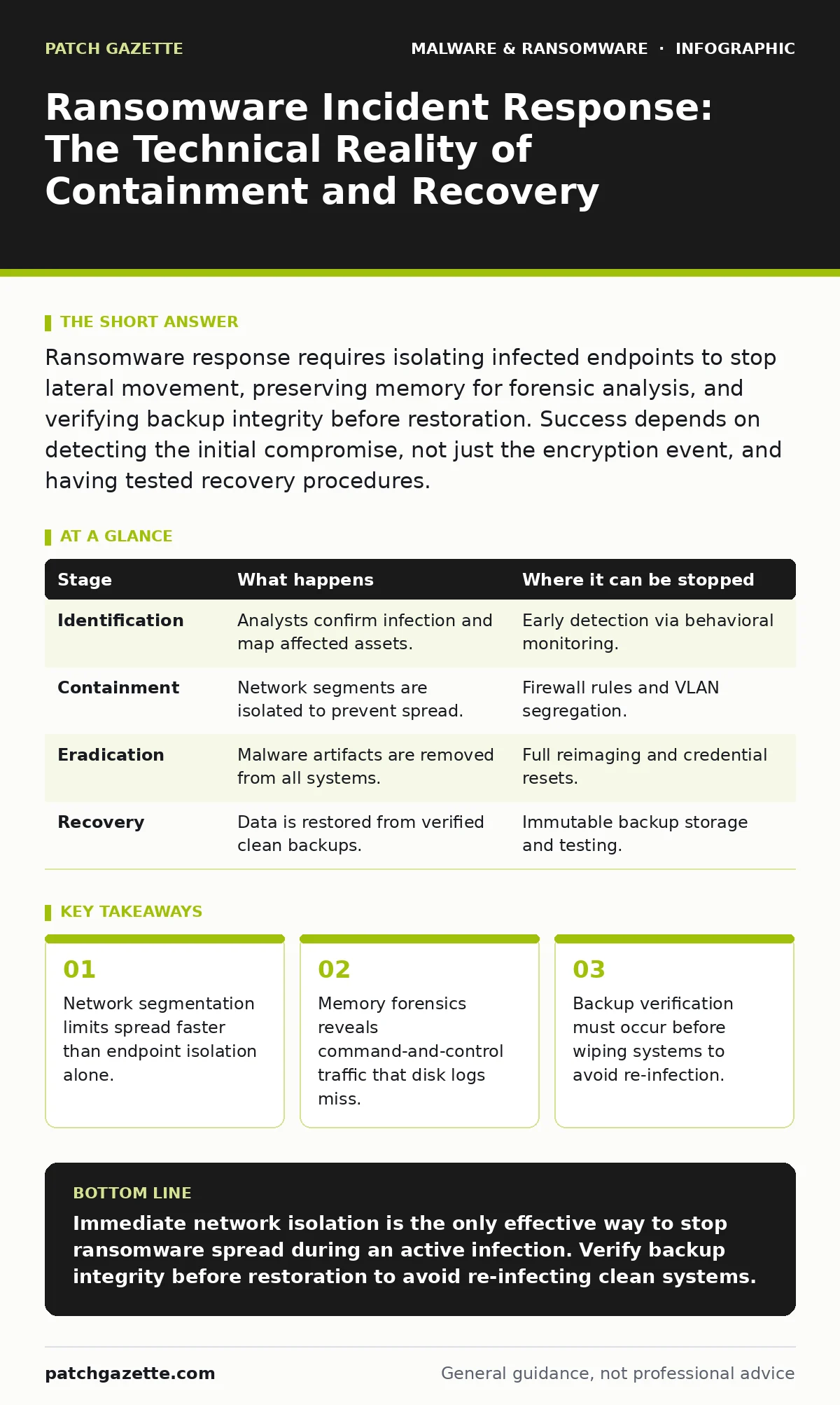
Ransomware response requires isolating infected endpoints to stop lateral movement, preserving memory for forensic analysis, and verifying backup integrity before restoration. Success depends on detecting the initial compromise, not just the encryption event, and having tested recovery procedures.
The Encryption Trigger and Initial Detection
Ransomware operates by encrypting files using asymmetric cryptography, meaning the private key needed to decrypt data resides only with the attacker. When the malware executes, it typically scans for specific file extensions and begins the encryption process immediately. Most organizations detect this phase through file integrity monitoring or user reports of inaccessible data, rather than through initial infiltration alerts.
By the time encryption is visible, the malware has already established persistence mechanisms within the operating system. These mechanisms ensure the malware survives reboots and continues to spread. Understanding that detection often lags behind execution is the first step in realistic planning. Your response must assume the attacker is already inside the network perimeter.
Stage 1: Identification and Scoping
The first technical task is determining the scope of the infection. You must identify which systems are encrypted and which are merely compromised but not yet encrypted. This distinction dictates the urgency of isolation. Check for unusual processes, high CPU usage, and new scheduled tasks that may indicate active encryption or staging for further spread.
Use network traffic analysis to look for beaconing activity. Beaconing is the regular communication between an infected host and a command-and-control server. Identifying these patterns helps you map the extent of the lateral movement. If you rely solely on antivirus software, you may miss fileless variants that operate in memory.
| Stage | What happens | Where it can be stopped |
|---|---|---|
| Identification | Analysts confirm infection and map affected assets. | Early detection via behavioral monitoring. |
| Containment | Network segments are isolated to prevent spread. | Firewall rules and VLAN segregation. |
| Eradication | Malware artifacts are removed from all systems. | Full reimaging and credential resets. |
| Recovery | Data is restored from verified clean backups. | Immutable backup storage and testing. |
Network Containment and Isolation
Containment is the most critical phase because ransomware spreads rapidly via shared drives and remote management protocols. You must disconnect affected systems from the network immediately. Physical disconnection is ideal, but disabling network interface cards via remote management tools is often faster. Do not power off the machines, as this destroys volatile memory containing evidence of the attack.
Imagine a scenario where a single workstation is encrypted. If you fail to isolate the subnet, the malware may use valid credentials to access file servers within minutes. Network segmentation acts as a speed bump, forcing the attacker to break through additional barriers. This buys time for your team to assess the situation without losing more data.
Forensic Preservation and Analysis
Before wiping any system, you must preserve evidence. The primary goal is to capture the state of the system at the time of infection. This includes taking a memory dump, which captures running processes, network connections, and unencrypted data in RAM. Disk images are also necessary to analyze file system changes and registry modifications.
These artifacts help determine how the attacker entered the network. Was it through a malicious documents attachment, an exploited vulnerability, or stolen credentials? Understanding the entry point is vital for preventing recurrence. Without this analysis, you are merely cleaning up the current infection without fixing the underlying breach.
Stage 2: Eradication and Credential Reset
Eradication involves removing the malware and all its components. Simply deleting the ransomware binary is insufficient. You must remove any malware persistence mechanisms such as registry run keys, scheduled tasks, or service installations. The most reliable method is to reimage the affected systems from known-good media.
You must also reset all credentials used on the compromised systems. Attackers often use credential dumping tools to harvest login hashes. Even if you remove the malware, the attacker may still have valid passwords. Resetting passwords and revoking active sessions ensures that stolen credentials cannot be used for further access.
Backup Verification and Restoration
Restoration is not simply a matter of copying files from a backup. You must first verify that your backups are clean. Ransomware may have encrypted your backup files before you noticed the attack on production systems. Check the timestamps and file hashes of recent backups to ensure they were not modified during the attack window.
Use disaster recovery plans to guide the restoration process. These plans should prioritize critical business applications. Restoring data to isolated segments allows you to verify functionality before reconnecting to the main network. This staged approach prevents a second wave of encryption if the backup media was compromised.
Post-Incident Review and Hardening
The final stage involves reviewing the incident to improve future defenses. Analyze the gap between the initial compromise and the detection. If the gap was hours or days, your monitoring needs adjustment. Implement additional logging and alerting for the specific tactics used in the attack.
Update your security policies to address the vulnerabilities exploited. This may include restricting administrative privileges, enforcing multi-factor authentication, and segmenting the network more aggressively. The goal is to increase the cost and complexity for future attackers, making your environment a less attractive target.
See also: Mobile Security Apps: Real Protection or Just Another Battery Drain? · Malware Persistence Mechanisms: How Code Stays Hidden After Removal
Limits of Technical Response
No technical measure can guarantee complete protection. Ransomware operators constantly adapt to bypass security controls. Your response plan must account for failures in detection and containment. Accepting that some data loss may occur allows you to focus on business continuity rather than perfect prevention.
The limit of your response is often human error. Employees may bypass security controls to meet deadlines, or administrators may make mistakes during the restoration process. Regular training and tabletop exercises help reduce these risks. The goal is resilience, not invulnerability.
Key takeaways
- Network segmentation limits spread faster than endpoint isolation alone.
- Memory forensics reveals command-and-control traffic that disk logs miss.
- Backup verification must occur before wiping systems to avoid re-infection.
Immediate network isolation is the only effective way to stop ransomware spread during an active infection. Verify backup integrity before restoration to avoid re-infecting clean systems.
Frequently asked questions
Should I pay the ransom to get my data back?
Paying does not guarantee decryption, funds criminal activity, and may mark your organization as a target for future attacks.
How long should I isolate a system before wiping it?
Isolate immediately upon detection. Forensic analysis should occur on the isolated system before any wiping or reimagining takes place.
Can antivirus software stop ransomware encryption?
Antivirus software can block known variants, but it often fails against new or fileless ransomware that operates in memory before dropping files.
What is the first step if I suspect an infection?
Disconnect the affected system from the network to prevent lateral movement, then contact your incident response team for forensic preservation.
How this guide was produced: written by the Patch Gazette editorial team with AI assistance, checked against the public references listed below, and reviewed when the facts change. See our editorial policy or report an error.