DNS Amplification Attack Warning Signs and Response Steps
Spoofed DNS queries turn tiny requests into massive floods, masking the attacker’s source while overwhelming your network edge with reflected traffic.
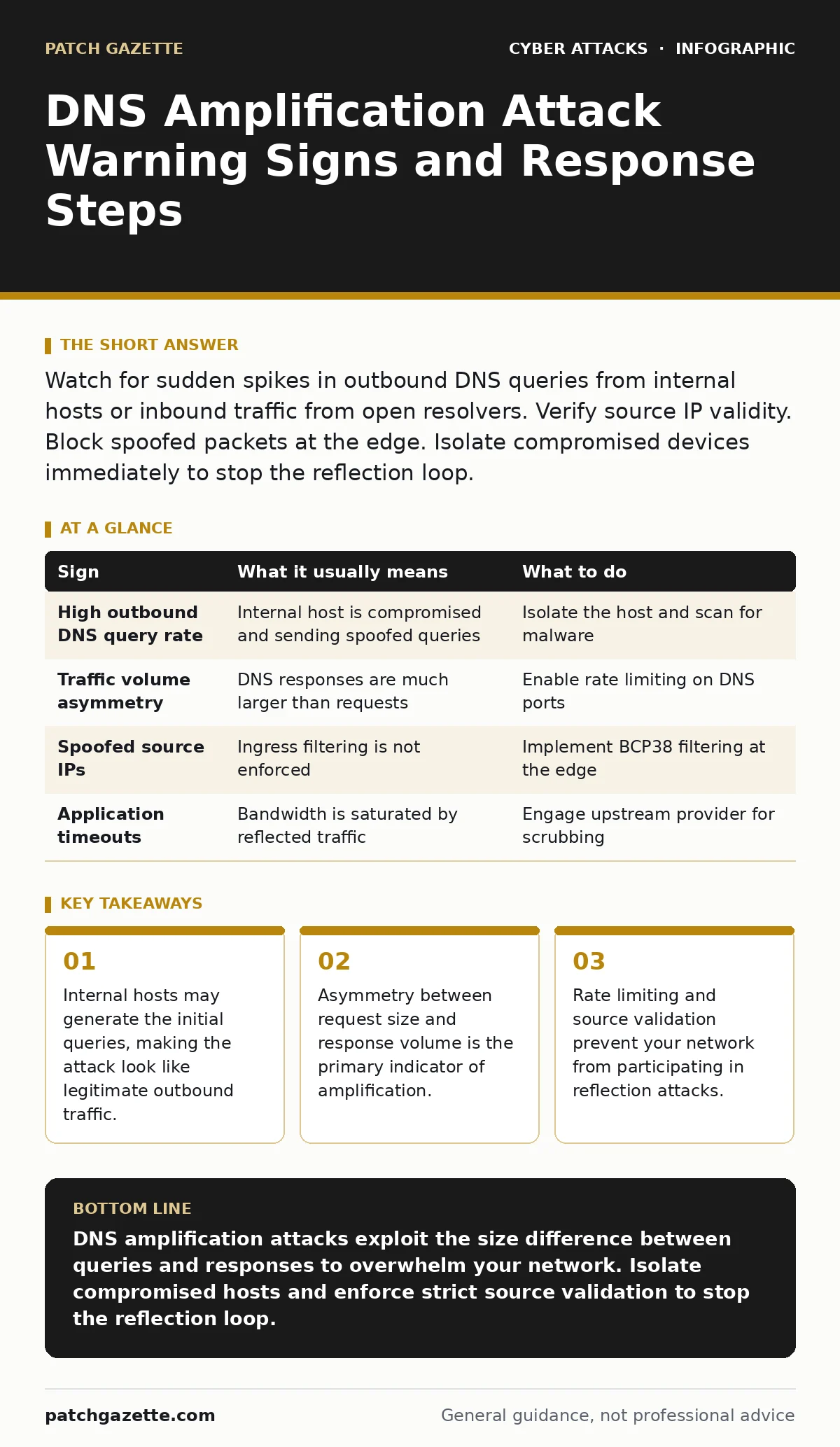
Watch for sudden spikes in outbound DNS queries from internal hosts or inbound traffic from open resolvers. Verify source IP validity. Block spoofed packets at the edge. Isolate compromised devices immediately to stop the reflection loop.
The Initial Outbound Spike
The first sign of a DNS amplification attack often appears on the sending side, not the receiving side. You will see a sudden increase in DNS query volume from specific internal hosts. These machines are likely compromised and sending thousands of requests per second. The queries are small, usually less than a hundred bytes, so they do not consume much bandwidth initially. However, the volume is abnormal for standard business operations.
Check your DNS server logs for repeated queries for the same domain or random subdomains. Legitimate users do not query random non-existent domains in rapid succession. If you see this pattern, an attacker is using your infrastructure to launch the attack. The traffic looks like outbound noise, but it is the trigger for a much larger inbound flood.
Inbound Traffic Asymmetry
The second phase is the reflection. You will notice a massive influx of traffic that does not match your outbound query rate. The response packets are significantly larger than the requests. DNS responses can be ten to fifty times larger than the queries that triggered them. This amplification factor creates the flood.
Monitor your firewall or edge router for traffic surges from external IP addresses. These addresses belong to open DNS resolvers, not the actual attacker. The traffic appears to come from many different sources, making it hard to block a single IP. The content of the packets is DNS data, but the volume is the weapon. Your bandwidth will saturate quickly if you do not detect this asymmetry.
Signs That Are Easy to Miss
Some indicators are subtle and require deeper inspection. You might see a drop in network performance without a clear cause. Applications become slow, and connections time out. This is because the flood consumes available bandwidth and processing power on your edge devices. The attack does not necessarily crash your servers; it chokes the pipeline leading to them.
Another hidden sign is the source IP validation failure. Many networks do not enforce strict ingress filtering. This allows spoofed packets to enter your network. If you see DNS responses from IP addresses that did not send queries, your ingress filtering is failing. This is a configuration issue that enables the attack. You must verify that incoming traffic has valid source addresses.
| Sign | What it usually means | What to do |
|---|---|---|
| High outbound DNS query rate | Internal host is compromised and sending spoofed queries | Isolate the host and scan for malware |
| Traffic volume asymmetry | DNS responses are much larger than requests | Enable rate limiting on DNS ports |
| Spoofed source IPs | Ingress filtering is not enforced | Implement BCP38 filtering at the edge |
| Application timeouts | Bandwidth is saturated by reflected traffic | Engage upstream provider for scrubbing |
Immediate Containment Steps
When you detect the signs, act quickly to contain the damage. First, isolate the internal hosts generating the queries. Disconnect them from the network or place them in a quarantine VLAN. This stops the trigger mechanism. Do not just block the inbound traffic; you must stop the outbound queries. If the queries continue, the reflection will persist.
Next, verify your DNS server configuration. Ensure that your DNS servers are not open resolvers. They should only answer queries for authorized clients. Restrict recursion to internal networks only. This prevents external attackers from using your DNS infrastructure for amplification. Check your firewall rules to ensure they block responses from unauthorized sources.
Edge Mitigation Strategies
Your network edge is the last line of defense. Implement rate limiting on UDP port 53. This port is used for DNS traffic. Limit the number of queries per second from a single IP address. This reduces the impact of any single compromised host. Also, implement source address validation. Drop packets with spoofed source IPs at the border router.
Consider using a DNS firewall or scrubbing service. These services filter malicious traffic before it reaches your network. They can absorb the flood and forward only legitimate traffic. This is especially useful if your bandwidth is already saturated. Work with your internet service provider to enable upstream filtering. They can drop spoofed traffic before it enters your connection.
See also: Phishing Explained: How Attackers Steal Trust and Data · Detect API Abuse: Log Patterns, Blind Spots, and Detection Tactics
Long-Term Prevention Measures
Prevention requires ongoing configuration management. Regularly audit your DNS server settings. Ensure that recursion is disabled for external clients. Update your firewall rules to block known open resolvers. This reduces the pool of amplifiers an attacker can use. Also, monitor your network for anomalous DNS behavior. Set up alerts for sudden spikes in query volume.
Implement conditional access policies to restrict device access. This ensures that only trusted devices can connect to your network. Compromised devices should be blocked from sending queries. Additionally, consider using passkeys for authentication. This reduces the risk of credential theft, which is often the entry point for botnet infections. See our guide on conditional access policies for more details.
Related Security Considerations
DNS amplification attacks are often part of a broader campaign. Attackers may use phishing to compromise initial hosts. They might also exploit API abuse to scale their operations. Understanding these related threats helps you build a stronger defense. Review your security posture against these vectors. See our guides on phishing and API abuse for more information.
Key takeaways
- Internal hosts may generate the initial queries, making the attack look like legitimate outbound traffic.
- Asymmetry between request size and response volume is the primary indicator of amplification.
- Rate limiting and source validation prevent your network from participating in reflection attacks.
DNS amplification attacks exploit the size difference between queries and responses to overwhelm your network. Isolate compromised hosts and enforce strict source validation to stop the reflection loop.
Frequently asked questions
How do I know if my DNS server is an open resolver?
Try querying your DNS server for a domain it should not resolve. If it returns an answer, it is open. Restrict recursion to internal clients only.
Can a firewall stop a DNS amplification attack?
A firewall can help by rate limiting and blocking spoofed IPs. However, it cannot stop the flood if your bandwidth is already saturated. Use upstream scrubbing for large attacks.
Why are DNS queries small and responses large?
DNS queries ask for information, which is brief. Responses contain the requested data, which can be large. Attackers exploit this size difference to amplify traffic.
Is DNS over HTTPS vulnerable to amplification?
DNS over HTTPS uses TCP, which is harder to spoof. However, it can still be used for reflection attacks. Implement rate limiting for DoH traffic as well.
How this guide was produced: written by the Patch Gazette editorial team with AI assistance, checked against the public references listed below, and reviewed when the facts change. See our editorial policy or report an error.