Passkeys Explained: Why They Resist Phishing and Where They Fail
Passkeys eliminate password reuse risks by using device-bound cryptographic keys, but they introduce new recovery complexities that traditional password managers do not handle.
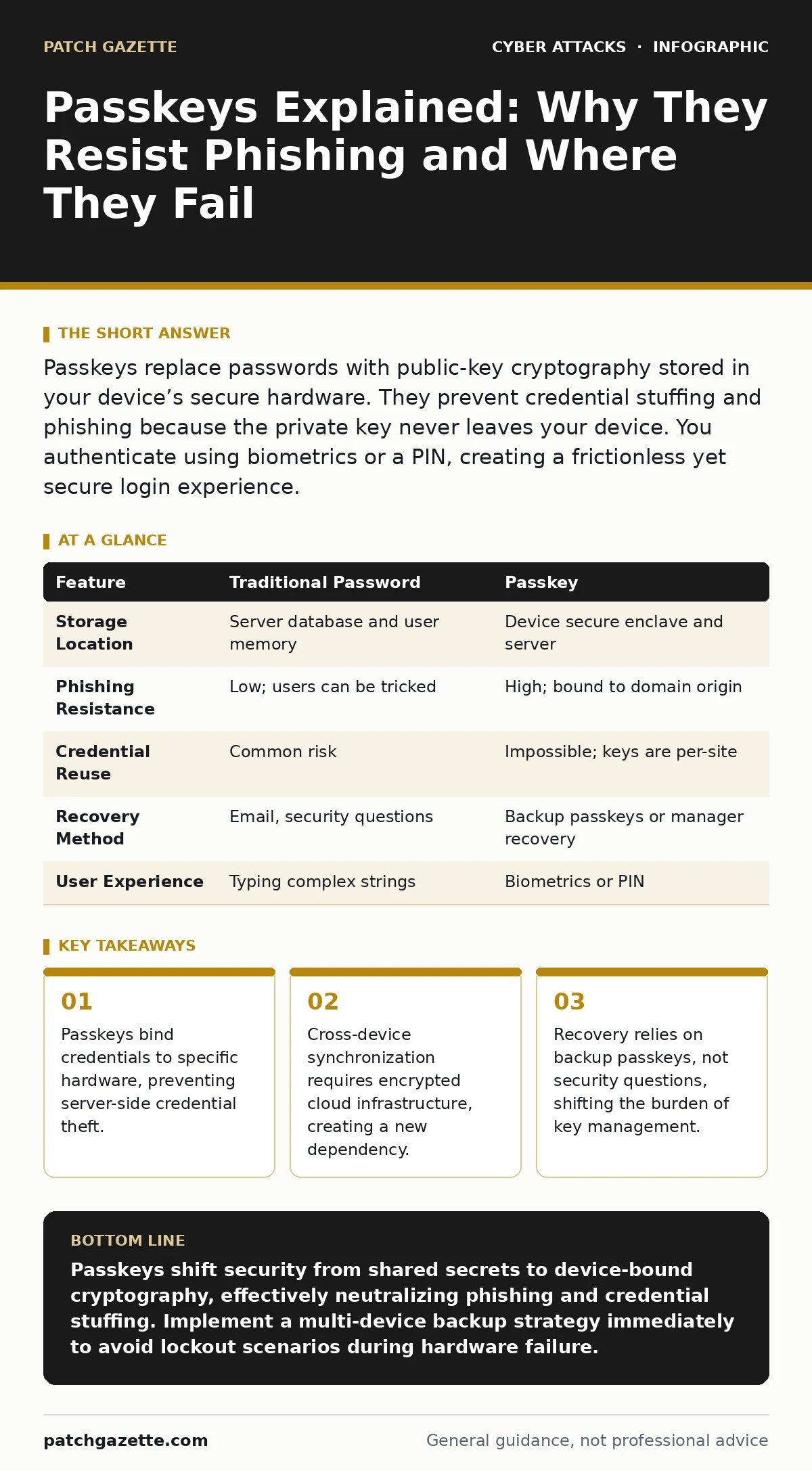
Passkeys replace passwords with public-key cryptography stored in your device’s secure hardware. They prevent credential stuffing and phishing because the private key never leaves your device. You authenticate using biometrics or a PIN, creating a frictionless yet secure login experience.
What exactly is a passkey?
A passkey is a digital credential that uses public-key cryptography to verify your identity without transmitting a shared secret. Unlike a password, which exists in both your memory and the server’s database, a passkey consists of a private key stored in your device and a public key stored on the server. When you log in, your device proves it holds the private key without ever sending it over the network.
This mechanism relies on the FIDO (Fast Identity Online) standard, which defines how devices and servers communicate during authentication. The private key remains protected by the device’s secure enclave, a hardware-isolated area of memory. This isolation ensures that even if malware infects your operating system, it cannot extract the key used for login.
How do passkeys prevent phishing attacks?
Passkeys are cryptographically bound to the specific domain or application requesting authentication. When you initiate a login, the browser or app includes the origin URL in the cryptographic challenge. Your device only signs this challenge if it matches the stored credential for that exact site.
Imagine a scenario where you visit a fraudulent site that looks identical to your bank. The phishing site requests your credentials, but the origin URL differs from the legitimate bank’s domain. Your device refuses to generate the cryptographic signature because the origin does not match. This binding makes replay attacks impossible, as the signature is valid only for that specific transaction and session. You cannot accidentally hand over a passkey to an imposter, even if the imposter captures your screen or keystrokes.
Do passkeys protect against data breaches?
Yes, because servers store only the public half of the key pair, which is useless without the corresponding private key. In a traditional password system, a breach exposes hashes that attackers can crack using rainbow table attacks to recover the original passwords. With passkeys, the stolen public keys cannot be used to log in to any service.
The private key never leaves your device, so there is nothing for attackers to steal from the server side. This eliminates the risk of credential stuffing, where attackers use breached credentials from one site to access others. Even if an attacker gains full administrative access to the authentication server, they cannot impersonate users. The compromise is limited to the public directory data, which lacks the power to authenticate.
What happens if I lose my device?
Losing the device holding your private keys locks you out of all services secured by those passkeys, unless you have a recovery plan. Unlike passwords, which you can reset via email or security questions, passkeys require a cryptographic proof of ownership to replace. You must register a new passkey on a new device, which requires verifying your identity through an alternative method.
Most services allow you to register multiple passkeys for the same account. This redundancy is critical for continuity. If your primary phone is lost, a passkey stored on your laptop or tablet can still grant access. Without such backups, you may need to contact support, which often involves slower, manual verification processes. This dependency on multiple devices or sync services is a structural change from single-password reliance.
How do passkeys work across multiple devices?
Cross-device functionality relies on encrypted synchronization services to replicate the private key across your trusted hardware. When you create a passkey on one device, the encryption key protecting it can be shared with other devices logged into the same ecosystem. This allows you to log in on a desktop using biometrics from your phone.
The synchronization process encrypts the passkeys so that only your trusted devices can decrypt and use them. This introduces a dependency on the cloud provider’s security posture. If the synchronization keys are compromised, an attacker could potentially unlock your passkeys on a new device. Therefore, the security of your passkeys extends beyond the individual device to the integrity of the sync infrastructure.
See also: Phishing Explained: How Attackers Steal Trust and Data · QR Code Phishing: Risks and Protection for Small Businesses
Can attackers steal passkeys from my device?
Extracting private keys from a device’s secure enclave is currently infeasible with standard software attacks. The secure enclave is designed to prevent the operating system and applications from reading the raw key material. Malware that captures screen input or keystrokes is ineffective because the user never types a secret string.
However, physical access to a unlocked device can expose passkeys if the device’s screen lock is bypassed. If an attacker gains control of your operating system while it is unlocked, they might be able to trigger authentication requests. This is why keeping your device locked when unattended remains a critical control. The threat model shifts from network interception to local device compromise.
What is the recovery process for passkeys?
Recovery depends on whether you use a password manager or native device storage. Password managers often generate backup codes or allow recovery via a master password. Native device implementations may use biometric data or hardware tokens as recovery mechanisms. Some services issue "recovery passkeys" that are stored offline or in a separate secure location.
The absence of a universal recovery standard means you must understand the specific mechanism for each service. Relying solely on biometric data on a single device is risky if that device is destroyed. A robust strategy involves storing recovery credentials in a physical medium, such as a printed code, or using a secondary device that acts as a backup. This approach mirrors the key management practices used in high-security environments.
How do passkeys compare to traditional passwords?
| Feature | Traditional Password | Passkey |
|---|---|---|
| Storage Location | Server database and user memory | Device secure enclave and server |
| Phishing Resistance | Low; users can be tricked | High; bound to domain origin |
| Credential Reuse | Common risk | Impossible; keys are per-site |
| Recovery Method | Email, security questions | Backup passkeys or manager recovery |
| User Experience | Typing complex strings | Biometrics or PIN |
Passwords require users to memorize complex strings, leading to reuse and weak choices. Passkeys remove the memory burden, replacing it with hardware-bound authentication. The trade-off is complexity in key management and recovery. While passwords are flexible but fragile, passkeys are secure but rigid. The choice involves balancing ease of recovery against the strength of authentication.
Are passkeys vulnerable to QR code phishing?
Passkeys mitigate many phishing vectors, but they do not automatically secure all interaction points. If a service uses QR codes to initiate a login flow, an attacker could potentially substitute a malicious QR code. Scanning this code might direct your device to a phishing site that requests your passkey.
However, because passkeys are bound to the domain, the phishing site cannot complete the authentication. Your device will reject the request if the origin does not match the registered service. This protection holds even if the initial interaction, such as scanning a code, is manipulated. The cryptographic binding serves as the final checkpoint, ensuring that the authentication request originates from the legitimate service.
Key takeaways
- Passkeys bind credentials to specific hardware, preventing server-side credential theft.
- Cross-device synchronization requires encrypted cloud infrastructure, creating a new dependency.
- Recovery relies on backup passkeys, not security questions, shifting the burden of key management.
Passkeys shift security from shared secrets to device-bound cryptography, effectively neutralizing phishing and credential stuffing. Implement a multi-device backup strategy immediately to avoid lockout scenarios during hardware failure.
Frequently asked questions
Do passkeys work offline?
Yes, passkeys function entirely on the device without an internet connection for the initial cryptographic signing. The device generates the signature locally, though the server must be online to verify it.
Can I use passkeys on public computers?
You can authenticate on public computers by using your personal device as a second factor. The public computer sends a challenge, and your phone or laptop signs it, keeping the private key secure on your trusted hardware.
Are passkeys compatible with all websites?
Passkeys rely on the FIDO standard, which is widely adopted but not universal. Major platforms and browsers support them, but smaller or legacy systems may still require traditional passwords. Check for the passkey icon in the login interface.
What if my biometrics fail?
If biometrics like fingerprints or facial recognition fail, you can fall back to your device PIN or password. This secondary method unlocks the secure enclave, allowing the device to use the stored private key for authentication.
How this guide was produced: written by the Patch Gazette editorial team with AI assistance, checked against the public references listed below, and reviewed when the facts change. See our editorial policy or report an error.