How IT Asset Management Works: The Hidden Data Flow
Asset management fails when inventory tools capture hardware serial numbers but miss the software dependencies that actually execute code on the network.
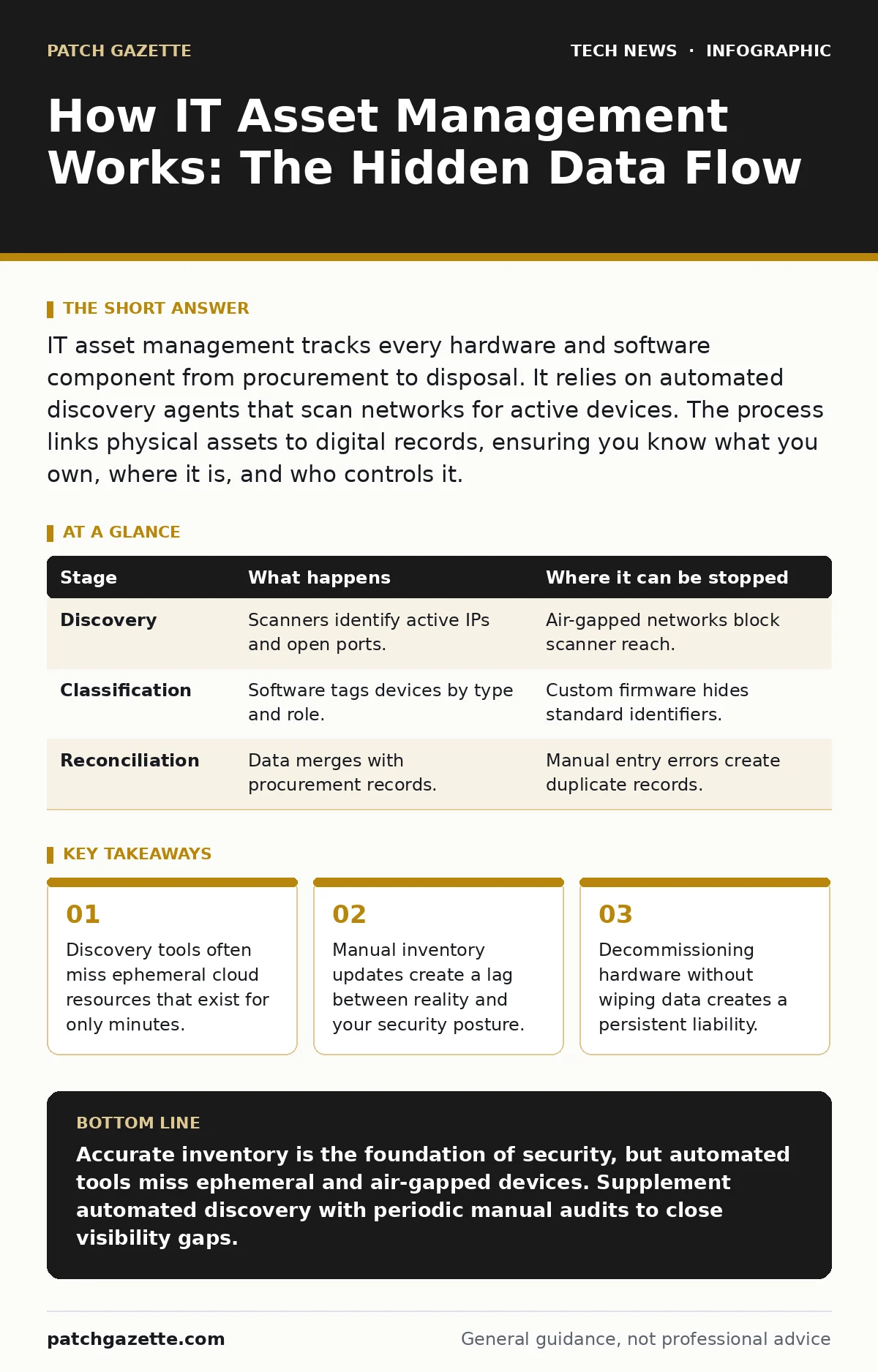
IT asset management tracks every hardware and software component from procurement to disposal. It relies on automated discovery agents that scan networks for active devices. The process links physical assets to digital records, ensuring you know what you own, where it is, and who controls it.
The Discovery Phase
You cannot protect what you do not know exists. The first stage of IT asset management is discovery, where software agents or network scanners identify active devices. These tools ping IP addresses, query directory services, and inspect open ports to build a list of connected endpoints.
Most organizations assume their inventory is complete because their endpoint detection and response tools are running. This assumption is dangerous. Discovery tools often fail to see devices that do not have standard operating systems or that operate on isolated segments.
Imagine a legacy industrial control system that communicates only via Modbus. A standard network scanner looking for HTTP or SSH traffic will never see it. That device remains invisible to your central inventory, creating a blind spot in your security perimeter.
Stage 1: Network Scanning
The mechanism begins with passive and active scanning. Passive scanning listens to network traffic to identify hosts, while active scanning sends probes to elicit responses. The goal is to map the topology of your environment.
| Stage | What happens | Where it can be stopped |
|---|---|---|
| Discovery | Scanners identify active IPs and open ports. | Air-gapped networks block scanner reach. |
| Classification | Software tags devices by type and role. | Custom firmware hides standard identifiers. |
| Reconciliation | Data merges with procurement records. | Manual entry errors create duplicate records. |
Classification and Context
Finding a device is useless if you do not know what it is. Classification assigns meaning to the raw data collected during discovery. The system tags each asset with metadata: operating system, manufacturer, model, and criticality.
This step relies on fingerprinting. The tool analyzes response patterns to determine if a device is a Windows server, a Linux workstation, or an IoT sensor. Accuracy here determines the effectiveness of later security policies.
If the classification is wrong, the security controls will be wrong. Suppose a high-security database server is misclassified as a general-purpose web server. It might receive only standard patching intervals, leaving it exposed to known vulnerabilities that require immediate attention.
Stage 2: Metadata Tagging
The system enriches the basic hardware record with software details. It reads registry keys, checks installed applications, and verifies license keys. This creates a bill of materials for each endpoint.
Reconciliation and Ownership
Raw discovery data is messy. Reconciliation cleans this data by matching discovered assets against your procurement records and financial ledgers. This step answers the question: Who is responsible for this device?
Without reconciliation, you have a list of things, not an inventory of assets. You need to link the serial number seen by the scanner to the purchase order in your finance system. This link establishes ownership and accountability.
Imagine a contractor brings a personal laptop to the office. The scanner sees it, but procurement has no record. Reconciliation flags this as an unauthorized device. The IT team can then decide whether to onboard it properly or block it from the network.
Stage 3: Record Matching
The system compares discovered attributes with master data. It looks for matches in serial numbers, MAC addresses, and unique identifiers. If a match is found, it updates the existing record. If not, it creates a new entry or flags it for review.
This process often fails when procurement data is incomplete. If the purchase order lacks the exact serial number, the automated match fails. Human intervention is required to bridge the gap, introducing delay and potential error.
Lifecycle Management
Assets change state over time. They move from procurement to deployment, then to maintenance, and finally to disposal. Lifecycle management tracks these transitions. It ensures that security controls adjust as the asset’s role changes.
A device moving from development to production requires different security settings. The asset manager must trigger these changes automatically. If the system relies on manual updates, the device may remain in a permissive state longer than necessary.
This stage also handles software updates. The system checks if the installed versions match the approved baseline. If a device runs an outdated version, the system generates a ticket for remediation.
Stage 4: State Transition
The system monitors triggers that indicate a change in status. These triggers might be location changes, user assignments, or configuration updates. When a trigger fires, the asset’s record is updated to reflect its new state.
Decommissioning and Disposal
The final stage is disposal. When an asset reaches end-of-life, it must be removed from the network and its data must be destroyed. This is not just about throwing away hardware. It is about ensuring that no residual data remains accessible.
Simply formatting a drive is often insufficient. Sophisticated recovery tools can reconstruct deleted files. Proper disposal requires cryptographic erasure or physical destruction of storage media.
Imagine a server that is taken offline but not properly decommissioned. If its hard drive is sold or recycled, the data on it may be recovered by anyone with the right tools. This creates a liability that persists long after the asset is gone.
Stage 5: Secure Wipe
The system initiates a secure erase procedure. This involves overwriting the storage media with random data or using manufacturer-specific commands to decrypt and discard the encryption keys. The asset manager records this action in the audit log.
This step is critical for compliance. Many regulations require proof of data destruction. Without a documented wipe process, you cannot demonstrate that you have protected sensitive information.
See also: Software Updates Best Practices: Secure Patching Without Downtime · Why Digital Signatures Matter for Code Integrity and Trust
The Limits of Automation
IT asset management systems are powerful, but they are not omniscient. They rely on the ability to communicate with devices. If a device is offline, air-gapped, or uses non-standard protocols, it will be missed.
Furthermore, these systems often struggle with ephemeral resources. Cloud instances that spin up and down in minutes may not be captured before they disappear. This creates a gap in visibility that attackers can exploit.
You must supplement automated tools with manual audits. Periodic physical checks and configuration reviews help catch what the software misses. Relying solely on automated discovery is a recipe for blind spots.
Integration with Security Controls
Asset management does not exist in a vacuum. It feeds data into other security systems. For instance, accurate inventory data helps DevOps security teams understand the attack surface of their applications.
It also supports TLS certificates management by identifying which devices require certificates. If the asset manager knows which servers are public-facing, it can ensure they have valid certificates.
Similarly, Linux server hardening relies on knowing which Linux versions are in use. The asset manager provides the baseline data that allows security teams to apply the correct hardening profiles.
The Human Element
Technology can discover and classify, but humans must decide. Policy decisions about risk tolerance, data classification, and acceptable use are human choices. The asset manager provides the data; you provide the judgment.
Without clear policies, the asset manager is just a data collector. You need to define what constitutes a critical asset, what data is sensitive, and who is authorized to access what. These definitions drive the effectiveness of the entire process.
Imagine a scenario where all laptops are treated as equally critical. The system will apply the same controls to a marketing intern’s laptop and a executive’s device. This wastes resources and may not provide adequate protection for the high-value target.
Continuous Improvement
IT asset management is not a one-time project. It is a continuous cycle of discovery, classification, reconciliation, and disposal. As your environment changes, so must your inventory.
Regular audits help identify gaps in the process. Look for discrepancies between what the system says and what is physically present. Investigate why devices are missing and fix the root cause.
This continuous improvement ensures that your inventory remains accurate. An accurate inventory is the foundation of effective security. Without it, you are defending a castle with invisible walls.
Key takeaways
- Discovery tools often miss ephemeral cloud resources that exist for only minutes.
- Manual inventory updates create a lag between reality and your security posture.
- Decommissioning hardware without wiping data creates a persistent liability.
Accurate inventory is the foundation of security, but automated tools miss ephemeral and air-gapped devices. Supplement automated discovery with periodic manual audits to close visibility gaps.
Frequently asked questions
How often should I run asset discovery scans?
Run automated scans daily or continuously. Manual reconciliations should occur monthly or after major infrastructure changes.
Can asset management tools detect unauthorized software?
Yes, if the tool has the capability to fingerprint installed applications. It compares found software against an approved list.
What happens if an asset is lost?
The system should flag the asset as missing. You must then initiate a security incident response, including remote wipe if possible.
Does asset management replace configuration management?
No. Asset management tracks what you have. Configuration management ensures those assets are set up correctly. They work together.
How this guide was produced: written by the Patch Gazette editorial team with AI assistance, checked against the public references listed below, and reviewed when the facts change. See our editorial policy or report an error.